


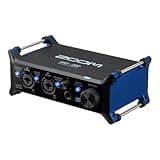


An audio interface is the bridge between your microphone, instruments, and computer. It converts analog audio to digital (and back), provides phantom power for condenser microphones, and determines the quality ceiling of your recordings. This guide covers everything from channel count to preamp quality and latency.
What Does an Audio Interface Do?
An audio interface serves several critical functions:
- ADC/DAC conversion — Converts analog signals (mic, guitar) to digital data for your computer, and digital audio back to analog for monitoring
- Microphone preamp — Amplifies the weak signal from microphones to a usable level
- Phantom power (+48V) — Powers condenser microphones
- Instrument input (Hi-Z) — High-impedance input for direct guitar/bass recording
- Low-latency monitoring — Routes input audio directly to headphones/speakers without going through the computer (eliminates latency)
Without an audio interface, your built-in laptop audio handles these functions — but at lower quality, higher noise, and without XLR microphone input.
Channel Count: How Many Inputs Do You Need?
| Inputs | Use Case | Example |
|---|---|---|
| 1 mic + 1 instrument | Solo podcaster, singer-songwriter, single person streaming | Focusrite Scarlett Solo |
| 2 mic inputs | Interview podcast, recording vocals + acoustic guitar simultaneously | Focusrite Scarlett 2i2, UA Volt 276 |
| 4+ inputs | Band recording, multi-instrument simultaneously, drums (submixed) | Focusrite Scarlett 4i4, Universal Audio Apollo Twin X |
| 8+ inputs + ADAT | Full drum recording, professional home studio | Focusrite Scarlett 18i8 |
For most home studio users, a 2-input interface (2i2 tier) is the right starting point. It handles 99% of solo recording scenarios and provides flexibility for adding a second microphone or direct instrument.
Preamp Quality
The microphone preamp is the most sonically impactful part of an audio interface. A poor preamp adds noise and coloration that can't be removed in post-processing. Key metrics:
- EIN (Equivalent Input Noise) — Lower is better. -128 dBu is excellent. Cheap interfaces may be -115 to -120 dBu.
- Maximum gain — 56dB+ is needed for low-output dynamic mics (Shure SM7B requires 60dB+). Some budget interfaces max at 46dB which is insufficient.
- THD+N — Total Harmonic Distortion + Noise. Lower is cleaner. Boutique preamps sometimes add pleasing harmonic color (tubes, transformers).
Sample Rate and Bit Depth
Most recordings are done at 24-bit/44.1kHz or 48kHz. 96kHz is used for video post-production (easier pitch/time manipulation) and some audiophile applications. 32-bit float recording (offered by some interfaces) prevents clipping — the digital level can exceed 0dBFS and be recovered in post, which is increasingly common in podcast/streaming contexts. 192kHz recording offers no audible benefit for most uses and taxes your computer's CPU.
Latency Considerations
Latency (delay between input and output) matters primarily for musicians monitoring themselves while recording. Key factors:
- Direct monitoring — Most interfaces offer zero-latency direct monitoring that routes the input signal directly to the headphone output, bypassing the computer entirely. Use this when recording.
- USB vs Thunderbolt — Thunderbolt interfaces (Universal Audio Apollo) achieve lower round-trip latency than USB. Matters for professional tracking sessions but negligible for podcasting and streaming.
- Driver quality — Windows requires ASIO drivers for low latency. Mac uses Core Audio which is generally well-optimized.
Budget Tiers
Under ¥15,000 — Entry
Focusrite Scarlett Solo (3rd Gen+) dominates this tier. Solid preamp, 24-bit/192kHz, USB-C, easy to set up. 1 XLR + 1 instrument input. Sufficient for solo podcasters and beginner home studio setups.
¥15,000–¥30,000 — Mid Range
The Focusrite Scarlett 2i2 adds a second XLR preamp for ¥5,000 more — worthwhile if you ever need to record two sources simultaneously. The Universal Audio Volt 276 adds an analog compressor (on the input) — unique feature at this price that can tame dynamic microphones without software.
¥30,000–¥80,000 — Enthusiast
The Focusrite Scarlett 4i4 adds more I/O. Third-party preamps like the SSL 2+ offer different sonic character. At the top of this range, the Universal Audio Apollo Solo introduces UAD DSP processing — run real-time UAD plugins (Neve, SSL, API emulations) with near-zero latency while recording.
¥80,000+ — Professional
Universal Apollo Twin X, Antelope Audio Zen Tour, RME Fireface — professional I/O with premium preamps, DSP, or extremely low latency (RME). RME interfaces are particularly beloved in professional studios for their stable drivers and low latency performance.
USB vs USB-C vs Thunderbolt vs Dante
Modern interfaces use USB-C (backward compatible with USB-A via cable). Thunderbolt provides lower latency and more bandwidth — required for 8+ channel interfaces running at 192kHz. Dante/MADI are professional network audio protocols for large-scale studio installations, not relevant for home recording. For most users, USB-C is perfectly sufficient.
Frequently Asked Questions
Do I need an audio interface for podcasting?
If you use an XLR microphone, yes — an audio interface or USB microphone preamp is required. If you use a USB microphone (like the Blue Yeti or AT2020 USB+), the interface is built into the microphone and you can plug directly into your computer. For maximum audio quality control and future flexibility to upgrade microphones, XLR microphone + audio interface is the better long-term setup.
What's the best audio interface for streaming?
The Focusrite Scarlett Solo or 2i2 handles most streaming setups well. If you want to include a second microphone for co-host interviews or want more routing options, the Scarlett 2i2 is the right choice. For more advanced streaming with multiple audio sources and scene switching, an interface with ADAT connectivity and a mixer application (Focusrite Control 2, Loopback on Mac) gives the most flexibility.
Can I use my audio interface as a DAC for headphone listening?
Yes. Most audio interfaces function as USB audio devices that replace your computer's sound card entirely. The headphone output on the interface will be cleaner than your laptop's built-in output. However, dedicated headphone DAC/amp units typically offer better headphone amplifier performance (more power, lower output impedance) than the headphone jack on a recording-focused audio interface.
What's the Focusrite Scarlett vs PreSonus AudioBox vs MOTU difference?
Focusrite Scarlett dominates the market because of its consistently good preamps across all price points and excellent software ecosystem (Focusrite Control, included plug-ins). PreSonus offers competitive quality and includes Studio One recording software. MOTU (Mark of the Unicorn) interfaces are well-regarded for professional use with particularly stable drivers. All three are solid — Focusrite has the best value-to-quality ratio in the entry-to-mid tier.
How much gain do I need for a Shure SM7B or SM7dB?
The Shure SM7B is famous for requiring a lot of gain — typically 60-70dB due to its low output (-59 dBV/Pa sensitivity). Many budget interfaces max at 46-56dB, which means you'll need to boost in software (adding noise) or use a Cloudlifter preamp booster. The Shure SM7dB has a built-in preamp that adds 28dB internally, making it work with standard interfaces. If you want the SM7B, get an interface with at least 60dB of clean gain — the Focusrite Scarlett Solo 4th Gen (56dB, borderline), Universal Audio Volt 176 (65dB), or MOTU M2 (60dB) are good choices.
